
CI/CD Pipeline with Auto-Migrate
Automated deployment pipeline with secret sync, deterministic startup, post-deploy health checks, and zero manual steps.
Key Results
Client
Enterprise SaaS Client
Industry
Sustainability & ESG
Location
Europe
Overview
Reliable deployments require more than pushing code—migrations must run before traffic hits new code, secrets must be in sync, and broken deploys need immediate visibility. Manual deployments were error-prone and inconsistent.
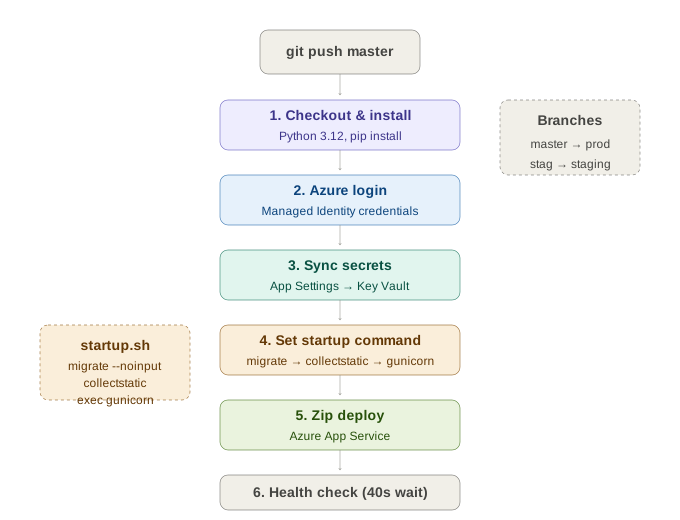
We built a CI/CD pipeline that syncs secrets to Key Vault, sets a deterministic startup command, deploys via zip, and validates the site is up—all in one automated flow. Production and staging share the same workflow with environment-specific variables.
Architecture Overview
The Challenge
Migration Timing
New code might reference database columns that don’t exist yet. Migrations had to run before the app served any traffic.
Secret Synchronization
App Settings and Key Vault could drift—a secret updated in one place but not the other caused runtime failures.
Silent Failures
A broken deploy might not be noticed until users reported errors. The pipeline needed to fail visibly if the site wasn’t healthy.
Our Solution
Architecture Overview
Secret Sync
App Settings → Key Vault before deploy
Zip Deploy
Direct zip upload to App Service
Health Check
Post-deploy site validation
Secret Sync Before Deploy
A script reads current App Settings and writes each mapped value to Key Vault. When the new app starts, it loads fresh secrets—guaranteed in sync with what CI knows about.
Deterministic Startup
The pipeline sets a startup command that runs migrate, collectstatic, then starts Gunicorn. Every deploy and every restart behaves identically—no manual steps, no forgotten migrations.
Zip Deploy
No Docker build in the main path—the repo is zipped and deployed directly, keeping the pipeline fast and simple. Branch mapping ensures master deploys to production and staging branch deploys to staging.
Post-Deploy Health Check
After deployment, the pipeline waits for the app to restart, then hits the site URL. If the response isn’t healthy, the workflow fails—broken deploys are visible in CI, not discovered by users.
Performance Metrics
Transaction Throughput
Response Time Distribution
1-Click
Deployments
Auto
Migrations
40s
Health Check
Zero
Manual Steps
Technology Stack
CI/CD
- GitHub Actions
- Zip Deploy
- Azure CLI
Runtime
- Gunicorn
- Django
- PostgreSQL
Infrastructure
- Azure App Service
- Key Vault
- Managed Identity
Outcomes & Impact
Deployment Impact
- Every deployment runs migrations automatically—no manual steps, no schema drift
- Secrets synced to Key Vault before deploy ensures runtime consistency
- Production and staging share the same workflow with environment-specific variables
Reliability
- Broken deploys fail the pipeline within 60 seconds of completion
- Deterministic startup—migrate → collectstatic → exec gunicorn on every restart
- The exec replaces the shell process so signals propagate correctly
Operational Simplicity
- No Docker build in the main path keeps pipeline fast and simple
- Azure login uses AZURE_CREDENTIALS; the app uses Managed Identity
- No secrets stored in the workflow file—everything sourced from Key Vault
“Deployments went from a nerve-wracking manual process to a one-click operation with full confidence. The health check alone has saved us from multiple potential outages.”

DevOps Lead
Enterprise Client
Related Case Studies
Dual-Queue Task System
Zero-infrastructure background processing with dual-queue architecture handling heavy GEE analysis alongside lightweight tasks without Redis or Celery.
Key Vault Secrets Management
Azure Key Vault as single source of truth for 40+ secrets with CI sync, managed identity auth, and file-based secret support.
Security Middleware Stack
Defense-in-depth request hardening with size limits, injection logging, brute-force tracking, and rate limiting—all without external services.
Ready to build something similar?
Let's discuss how we can apply the same engineering excellence to your project.